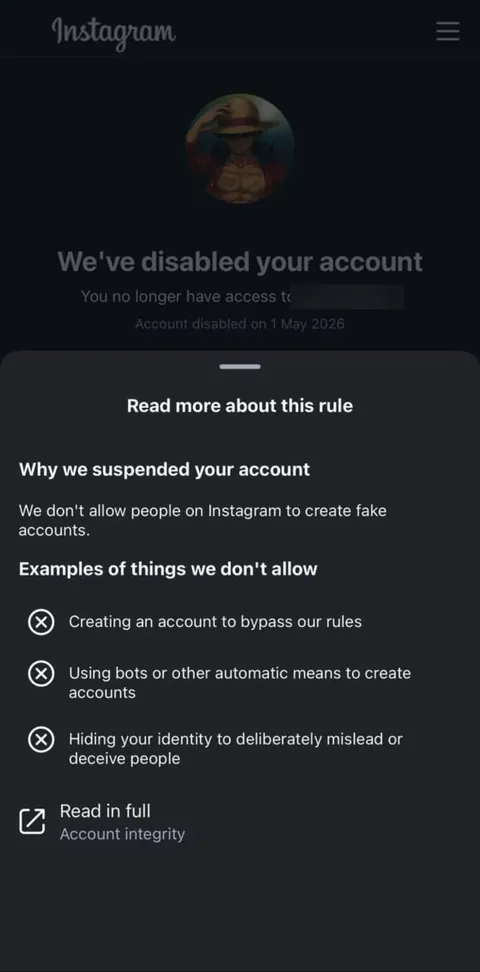
Instagram · shown after a review
We’ve disabled your account
You no longer have access to ••••••••
Account disabled on [date]
We don’t allow people on Instagram to create fake accounts.
Different wording on your screen? Paste it into the notice decoder →
Short answer
This screen usually comes after a review: Instagram looked at the account again and kept its decision. Look closely at your own screen. If it still offers Disagree, an appeal or a date to appeal by, use it now. If it offers nothing, the in-app route is closed; what remains is Instagram’s help page and, for users in the EU, a certified out-of-court dispute body.
Suspended or disabled: the difference
“We suspended your account” opens a window to appeal. “We’ve disabled your account” usually comes after Instagram has looked at the account and kept its decision, which is why this screen often has no appeal button. It is the more serious of the two screens — but on its own it does not mean nothing can be done.
The screen, line by line
- “We’ve disabled your account” — the account is disabled, not just hidden for review.
- “You no longer have access to [username]” — names the account concerned.
- “Account disabled on [date]” — keep this date; it matters for any further step.
- “Read more about this rule” — opens the rule the decision rests on. On the screen above: “Why we suspended your account — We don’t allow people on Instagram to create fake accounts.”
- “Examples of things we don’t allow” — on that screen: creating an account to bypass our rules; using bots or other automatic means to create accounts; hiding your identity to deliberately mislead or deceive people.
- “Read in full — Account integrity” — the full rule in Instagram’s Community Standards.
Account integrity, in plain words
Account integrity is the part of Instagram’s rules about authentic identity and how accounts are created and used. Decisions under it are often automated, and they catch real people too: a second account for a business, a username that looks like someone else’s, a sudden change of devices or location, or an account bought or sold. If none of the examples on your screen describe what you did, that is exactly what the remaining routes are for.
Is there anything left to do?
- An option or a date is shown: the decision can still be challenged; use the option before that date.
- No option at all: use the official help page for disabled accounts, help.instagram.com.
- You live in the EU: under the Digital Services Act you can take the decision to a certified out-of-court dispute body. See Appeals Centre Europe and other DSA dispute bodies.
What to do now
- Screenshot the screen, the username it names, the date and the rule sheet.
- Write down when the account was first suspended and what you sent in the appeal.
- Gather proof that the account is authentic and yours: the email that created it, earlier usernames, ID that matches the name on it, business documents for a business account.
- Keep the email and phone number on the account working.
- Do not open a replacement account while the case is open.
Mistakes that make it worse
- Opening a new account straight away — under account integrity that can look like the very thing the rule forbids.
- Buying a “reactivation” from someone who asks for your login.
- Sending complaints through every channel at once with different stories.
What not to do
- Do not hand your login to anyone who says they can “reactivate” the account; that is how disabled accounts get stolen a second time.
- Do not pay for promised results. No one outside Instagram decides the outcome.
Frequently asked questions
Is “We’ve disabled your account” permanent?
It is the result of a review, so it is meant as final. If your screen still shows an appeal option or a date, the decision can still be challenged until then.
What does “account integrity” mean?
It is the part of Instagram’s Community Standards about authentic identity and how accounts are used, for example impersonation, fake or automated activity, or buying and selling accounts.
My account was real. Why was it disabled for fake accounts?
Automated checks can mistake real accounts for fake ones, for example after a device change or because of a second account. The remaining routes exist for exactly that.
Can I get my photos back?
If the account is restored, its content returns with it. A disabled account is not accessible, so download your information regularly from accounts you care about.
Can I open a new account?
Not while the case is open. Under account integrity a new account can look like an attempt to get around the decision.