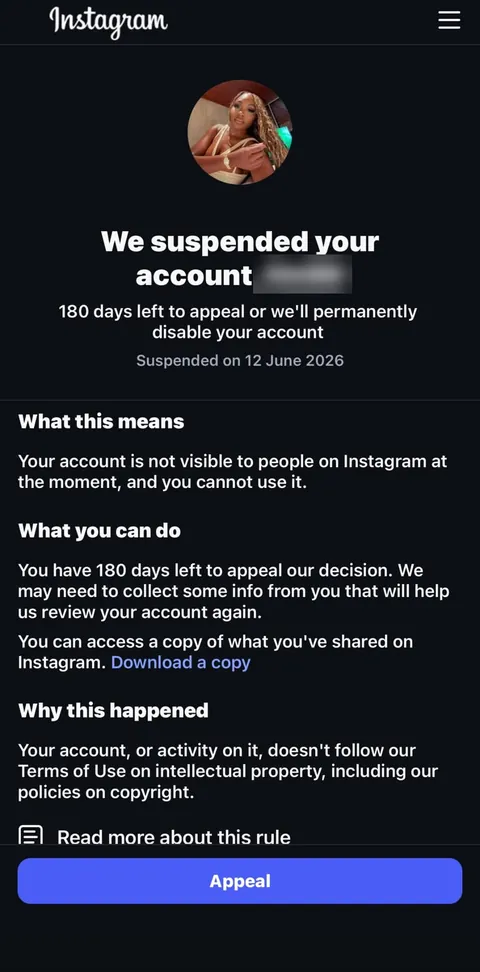
Instagram · shown when you log in
We suspended your account
180 days left to appeal or we’ll permanently disable your account
Suspended on [date]
Appeal
Different wording on your screen? Paste it into the notice decoder →
Short answer
Tap Appeal on the notice and follow the steps. The notice shows the date your account was suspended and a 180-day window to appeal; once it closes, or if the appeal fails, Instagram permanently disables the account. Appeal once and carefully, and do any identity check yourself, in the Instagram app on your own phone.
What the notice means
Your account is not visible to other people right now and you cannot use it. Instagram believes the account, or activity on it, broke its rules, and it is giving you a window to ask for a second look before the decision becomes permanent.
Suspended is not deleted. While the appeal window is open the account, its followers and its content still exist, and the decision can be reversed. That is the single most important thing to understand on the first day: you are still inside the window where the outcome can change.
The notice, line by line
- “We suspended your account, [name]” — the display name of the account, so you can be sure which account the notice is about.
- “180 days left to appeal or we’ll permanently disable your account” — your deadline. After it, or after a failed appeal, the account is permanently disabled.
- “Suspended on [date]” — the day the clock started. Count your 180 days from here.
- “What this means” — confirms the account is hidden and unusable for now.
- “What you can do” — says Instagram may need to collect some information from you to review the account again. In practice that is often an identity check.
- “You can access a copy of what you’ve shared on Instagram. Download a copy” — you can still request your data while suspended. Do it.
- “Why this happened” — the rule Instagram says was broken. This line decides how the appeal should be written.
- “Appeal” — the button that starts the review.
The reason line: what we see on real notices
The “Why this happened” line names the area of Instagram’s rules the decision rests on. Two that appear on notices in our case files:
- Intellectual property, including copyright — “Your account, or activity on it, doesn’t follow our Terms of Use on intellectual property, including our policies on copyright.” Typically linked to reports about posts, reels or music that someone else claims to own.
- Account integrity and authentic identity — “doesn’t follow our Community Standards on account integrity and authentic identity.” Linked to suspected impersonation, fake or automated activity, or buying and selling accounts.
Tap Read more about this rule on your own notice and screenshot what it shows; it is the most precise description of what you are answering.
Your deadline
The notice prints the day the account was suspended. Count 180 days from that date and write the last day down — our appeal deadline calculator does it for you. Do not leave the appeal to the last weeks: reviews take time, and you may be asked to confirm your identity before Instagram looks at the case at all.
If your notice shows a different number of days, that number is the one that counts.
Before you tap Appeal
- Screenshot the whole notice, including the date and the reason line.
- Request your data with Download a copy while it is still offered.
- Make sure you still control the email address and phone number on the account; the answer arrives there.
- Collect what proves the account is yours and used legitimately: the email that created it, earlier usernames, business documents if it is a business account, licences or permissions for content if the reason is copyright.
- Write your explanation down first, in three or four plain sentences that answer the reason line — not a general story about the account.
How to appeal, step by step
- Tap Appeal and follow every screen to the end.
- If Instagram asks for a video selfie or an ID, do it in the Instagram app on your own phone, in good light, and only once.
- Where you can add text, use the explanation you prepared. Stay factual and short.
- Submit once. Repeated submissions do not speed anything up.
- Watch the email linked to the account and the Instagram app itself; trust only messages that arrive there.
If you cannot find the appeal any more, Instagram’s help page for disabled and suspended accounts is help.instagram.com.
After you appeal: what can happen
- The account comes back. The profile, followers and posts return as they were.
- The decision stands. The screen changes to “We disabled your account” — see what that screen means and what is still possible.
- More information is requested. Answer it in the app, the same way you did the first time.
Mistakes that cost cases
- Waiting until the final weeks of the 180 days.
- Writing a long, emotional appeal that never answers the reason line.
- Sending the same appeal again and again.
- Opening a new account to “wait it out” — Instagram treats that as getting around enforcement.
- Losing access to the account email during the review.
What not to do
- Do not give your password or verification codes to anyone. “Meta support” accounts that contact you by message are scams.
- Do not pay anyone who promises a guaranteed unban or “insider access”; no one outside Instagram decides the outcome.
Frequently asked questions
Can I still appeal after the 180 days?
No. When the window on the notice closes, Instagram permanently disables the account and the in-app appeal is no longer offered.
Does “suspended” mean my account is deleted?
No. A suspended account still exists while the appeal window is open; it is hidden from other people and you cannot use it.
Can I download my photos while suspended?
Yes, if your notice shows “Download a copy”. Request it straight away; it is your copy whatever the outcome.
What if the reason is copyright?
Answer the copyright point directly: show that you own the content, have permission, or that the claim is wrong. A general description of the account does not help.
Should I create a new account while I wait?
Better not. Creating new accounts to get around enforcement is against Instagram’s rules and can count against you in the review.
How long does the review take?
It varies from case to case and Instagram does not publish a fixed time. Appeal early so the review fits inside your window.